



















































On February 1, 2026, ComfyUI, a versatile application for image and video generation using artificial intelligence, announced its newest updates aimed at simplifying local installations on personal computers. The software is compatible with NVIDIA graphics cards and various AI models, providing users with same-day support for new models optimized for both NVIDIA and AMD GPUs, making it a recommended choice for beginners in image and video generation.
Historically, installing such software required intricate command-line operations and node configurations. However, the latest updates have streamlined this process, allowing users to set up the application with just a few clicks. ComfyUI is designed for use on machines with dedicated graphics capabilities, such as gaming PCs, and the company has provided a detailed guide to help new users navigate installation and their first projects.
To install ComfyUI, users can navigate to the official ComfyUI website and click on ‘Download ComfyUI.’ The straightforward installation process begins with downloading the Windows installer. Once downloaded, users double-click the installer to launch it, followed by a simple click on ‘Install.’ After a brief installation period, users click ‘Finish’ to complete the setup.
Upon launching ComfyUI for the first time, users are prompted to install Git, a version control software essential for optimal performance. The application guides users to the Git download page, where they can initiate the installation. Following standard installation steps, users can customize their settings before completing the Git installation and returning to the ComfyUI setup interface.
During the setup, users are asked to select their hardware configuration. ComfyUI recommends systems equipped with either NVIDIA or AMD GPUs, as these setups enhance the speed of image and video generation. As of the latest updates, NVIDIA GPUs are noted for their superior performance, although efforts are underway to improve AMD’s capabilities.
Users can specify the folder for saving AI models, with defaults set to organize files neatly. ComfyUI allows for automatic updates and data collection, both of which are enabled by default. After confirming these settings, the application proceeds to automatically configure various settings, culminating in a template selection screen that marks the completion of installation.
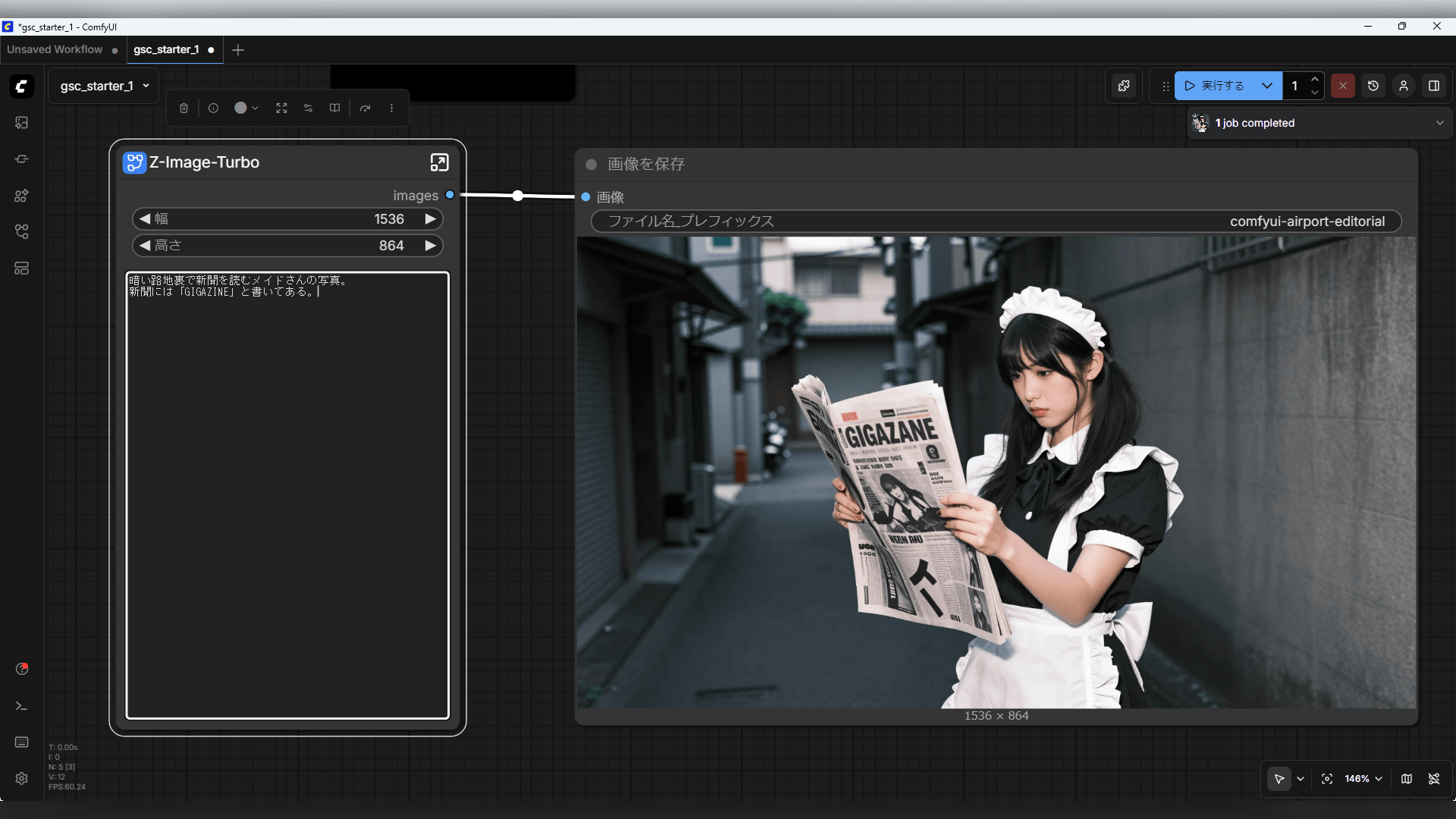
Once set up, ComfyUI offers various functionalities, including the ability to manage models and workflows for generating images and videos. Users can start with a beginner-friendly workflow titled ‘Generate images with Z-Image-Turbo.’ The process begins by selecting the template and downloading necessary models, which are essential for the generation process.
To create an image, users simply drag and connect nodes within the workflow interface that define the parameters of the generation process, such as the resolution and prompt for the desired image. After establishing these connections, a click on ‘Run’ initiates the generation, producing an image based on the specified parameters.
The generated images are stored in a designated output folder, allowing users to easily locate their creations. For instance, an image depicting “a real-life woman walking through an airport” can be found in the output location specified during installation. Users can modify prompts and rerun the generation process to produce different images, capitalizing on the software’s support for multiple languages, including Japanese.
ComfyUI provides a robust platform for creative exploration, allowing for the customization of image generation workflows. The application supports a variety of models, accessible from platforms like Civitai and SeaArt AI, which offer diverse options ranging from illustrative to photo-realistic styles. Users can even drag and drop previously generated images back into the interface to analyze the workflows that produced them, enhancing the learning experience and broadening creative possibilities.
As artificial intelligence continues to evolve, tools like ComfyUI are making advanced image and video generation more accessible to a wider audience. This democratization of technology not only encourages creativity but also fosters innovation in the fields of art and design, promising exciting developments in content creation and digital storytelling.
See also Survey: 61.5% of Korean Workers Use AI at Work; 71.7% Among Those Aged 35-39
 Beijing Academy of Artificial Intelligence Publishes Emu3 Model in Nature, Advancing Multimodal Learning
 Midjourney and Canva Unveil Enhanced AI Image Generators with Faster Response Times and Improved Accuracy
 AI Video Generator Market Projects $9.3Bn by 2033, Growing at 30.7% CAGR
 Airbus & ST Engineering Launch 3D SAR Partnership with Generative AI for Enhanced Earth Observation