










































Google’s rollout of Android 16 QPR3 this month introduces a sought-after customization feature: custom app icons for its Pixel devices. However, this new functionality is hampered by limitations in the generative AI tools provided, which fall short when compared to the offerings from both first-party and third-party app launchers.
In a recent test on the Pixel 10a, users can access five custom icon styles—Scribbles, Cookies, Easel, Treasure, and Stardust—within the Wallpaper & Style menu. While selecting a style allows for slight color customization, the options remain restricted. For instance, both the Cookies and Stardust styles are confined to their preset color palettes, limiting user creativity.
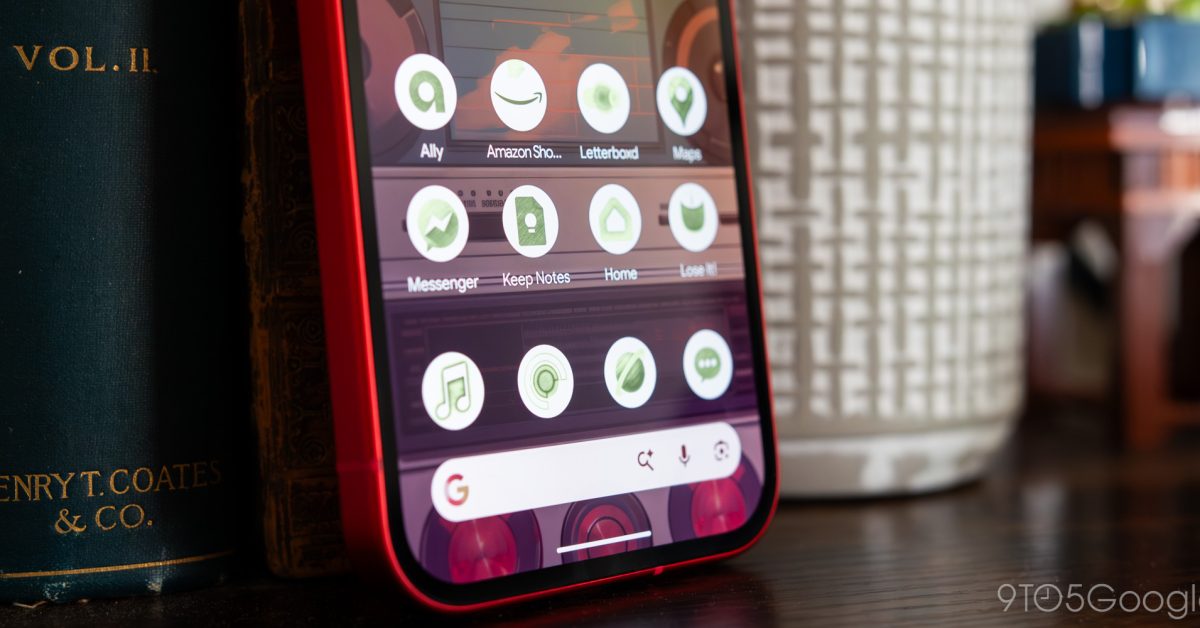
After choosing a style, the Pixel provides a preview of nine app icons, including both first-party and third-party applications. While initial designs for many first-party apps appeared satisfactory, issues arose with popular third-party applications such as Apple Music and Letterboxd. Icons featuring predominantly circular shapes struggled in generation, leading to elements disappearing or being misrepresented. For example, Letterboxd’s recognizable circles were often reduced to just one.
If users find the generated icons unsatisfactory, they can provide feedback or regenerate the design. However, the iterative nature of AI-generated art often leads to unsatisfactory results, with subsequent attempts either failing to address the issues or further complicating the design. Without the ability to specify which elements require adjustment, users may feel frustrated by the trial-and-error process.
Another significant drawback is the inability to preview all home screen icons before finalizing the customizations. Users can only view the nine selected icons during the initial selection phase, necessitating a return to the Wallpaper & Style menu after applying changes for further adjustments. This lack of immediacy can make the process cumbersome. The effectiveness of each style may vary significantly, meaning users must navigate through multiple iterations to achieve a satisfactory look.
Despite long-standing anticipation for enhanced customization options on Google’s Pixel launcher, the AI-generated icons do not effectively replace traditional icon packs. They serve more as automatically generated themes inspired by existing designs, failing to create a cohesive home screen aesthetic. Users looking for a unified visual experience would still benefit more from third-party launchers and dedicated icon packs.
The system also exhibits shortcomings common in traditional icon packs. For example, it does not automatically update icons based on new designs introduced by app updates. After a recent change to the Google Maps logo, users who generated icon styles using the AI tools were left with outdated visuals, highlighting the limitations of Google’s system in keeping pace with evolving app designs.
As AI-driven customization features continue to evolve, they may ultimately represent a future direction for Android personalization, particularly for the Pixel line. However, the current offering appears more of a novelty rather than a comprehensive solution, mirroring sentiments surrounding numerous AI features in the mobile space today. Without significant improvements, users may remain skeptical about the viability of these AI-generated icons as a compelling alternative to established customization methods.
See also Enhance Your Website”s Clarity for AI Understanding and User Engagement
 FoloToy Halts Sales of AI Teddy Bear After Disturbing Child Interactions Found
 AI Experts Discuss Vertical Markets: Strategies for Targeted Business Growth
 Law Firms Shift to AI-Driven Answer Engine Optimization for Enhanced Marketing Success
 Anthropic Disrupts State-Sponsored Cybercrime Using Claude AI, Reveals Key Insights