






















































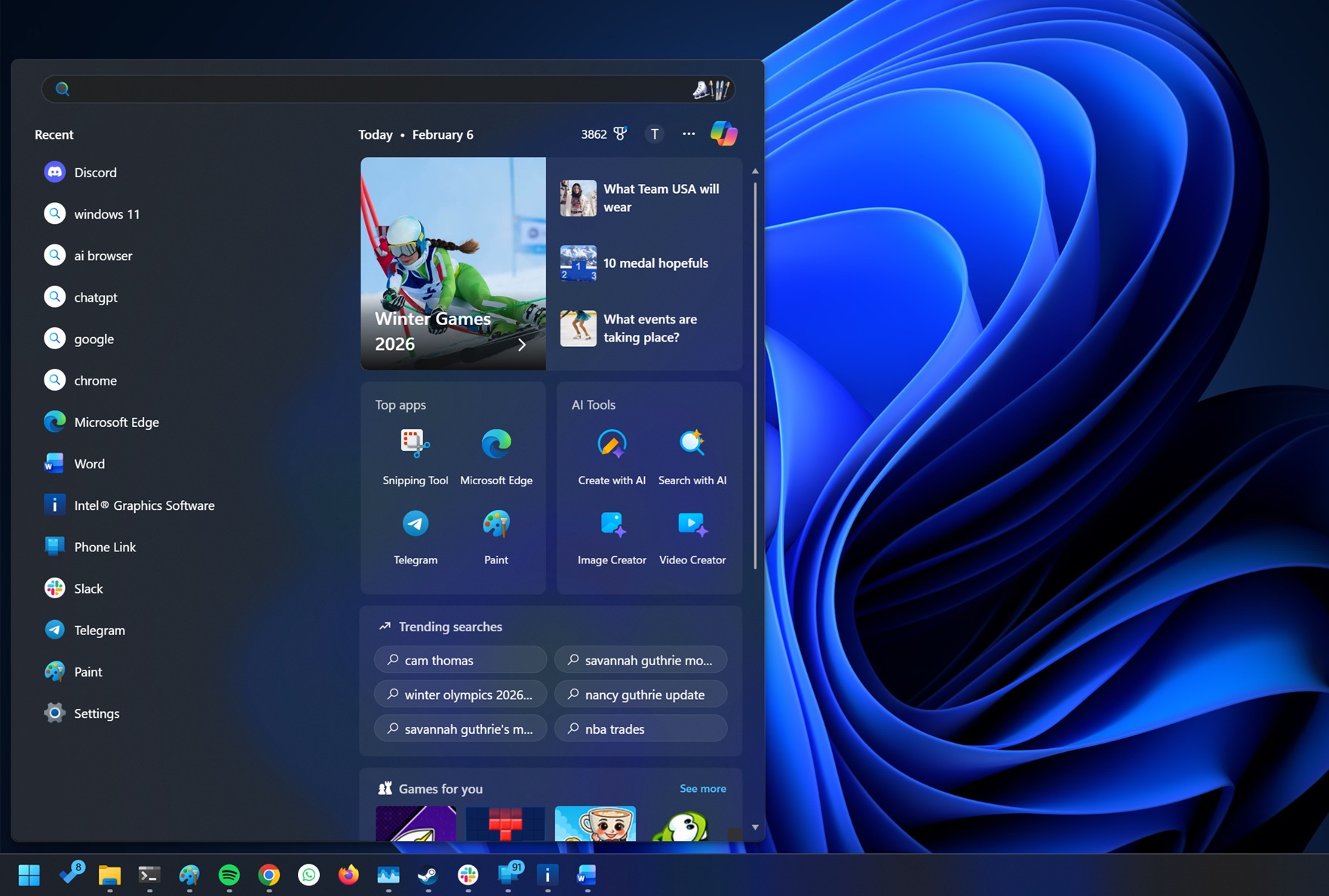
Microsoft’s Windows Search feature has drawn criticism for its cluttered interface, which now prominently displays “AI” tools that redirect users to Bing.com instead of enhancing the search experience. While Windows Search has been functional for many users, its recent updates have shifted its focus from a utility to what some describe as a social media-like platform that prioritizes AI integration over traditional search capabilities.
The inclusion of “AI Tools” in Windows Search appears to be a strategic move by Microsoft, but user feedback suggests that these tools—featuring options like Create with AI, Search with AI, Image Creator, and Video Creator—serve more as distractions than useful enhancements. Positioned within the main grid of Windows Search, these AI tools are impossible to ignore, even when users simply intend to locate applications or files.
With no option to disable these features, users have expressed frustration. Clicking on one of the AI tools does not offer any additional functionality within Windows Search; instead, it simply redirects to Bing.com, further complicating the user experience. As a workaround, users can modify Windows 11’s Registry settings to remove these AI tools and other unwanted suggestions from their search results. This involves a series of steps that include accessing the Registry Editor and creating a new key to disable search box suggestions.
For those willing to navigate the Registry, instructions detail how to disable the “AI tools” by locating the appropriate key and changing its value. Once this is accomplished, users can restart their PC to see a streamlined version of Windows Search, free from the aforementioned suggestions. Screenshots shared in user forums illustrate the differences before and after making these adjustments.
While Microsoft has not signaled any intention to overhaul the Windows Search feature, it is simultaneously testing a new interface known as “Ask Copilot.” Anticipated for release in 2026, this Copilot-powered search aims to provide a less cluttered experience focused on user intent. Unlike its predecessor, Ask Copilot promises to understand user queries better, potentially offering more relevant results by analyzing the context of searches.
In contrast to the current Windows Search, the Ask Copilot feature is expected to be more streamlined, prioritizing ease of use over additional distractions. Early tests indicate that users may find it easier to locate settings, files, or applications without the noise of AI tools. For example, if a user searches for a query like “how to make my screen brighter,” the Copilot feature is designed to intuitively direct them to the appropriate settings without requiring specific terminology.
As Microsoft continues to innovate and enhance its operating systems, the reception of these changes remains to be seen. While the existing Windows Search feature faces backlash for its overwhelming interface, the potential of Ask Copilot signals a broader shift toward integrating AI in a way that aims to genuinely assist users rather than simply promote Microsoft’s services. As the landscape of digital search evolves, users may find themselves weighing the benefits of traditional search methods against the capabilities of AI-powered alternatives.
See also Utah Startups Embrace ‘Agentic AI’ in Mobile Apps for Enhanced Productivity
 Skywork Launches Desktop AI Agent for Windows, Enhancing Productivity with Local File Intelligence
 Skywork Launches Desktop AI Agent for Windows, Enhancing Productivity with Local File Intelligence
 OpenAI Reveals 20+ AI Project Ideas for 2026 to Boost Your Career Prospects
 Veeva Systems Standardizes 13 of Top 20 Biopharma Firms on AI-Driven Link Data