































Google has unveiled significant updates to its Chrome Enterprise platform, integrating advanced artificial intelligence (AI) capabilities aimed at enhancing productivity in corporate environments. These new features, which include “Auto Browse” and “Skills,” are designed to automate routine tasks, thereby allowing employees to focus on more strategic activities while providing IT administrators with improved oversight of AI tools and security.
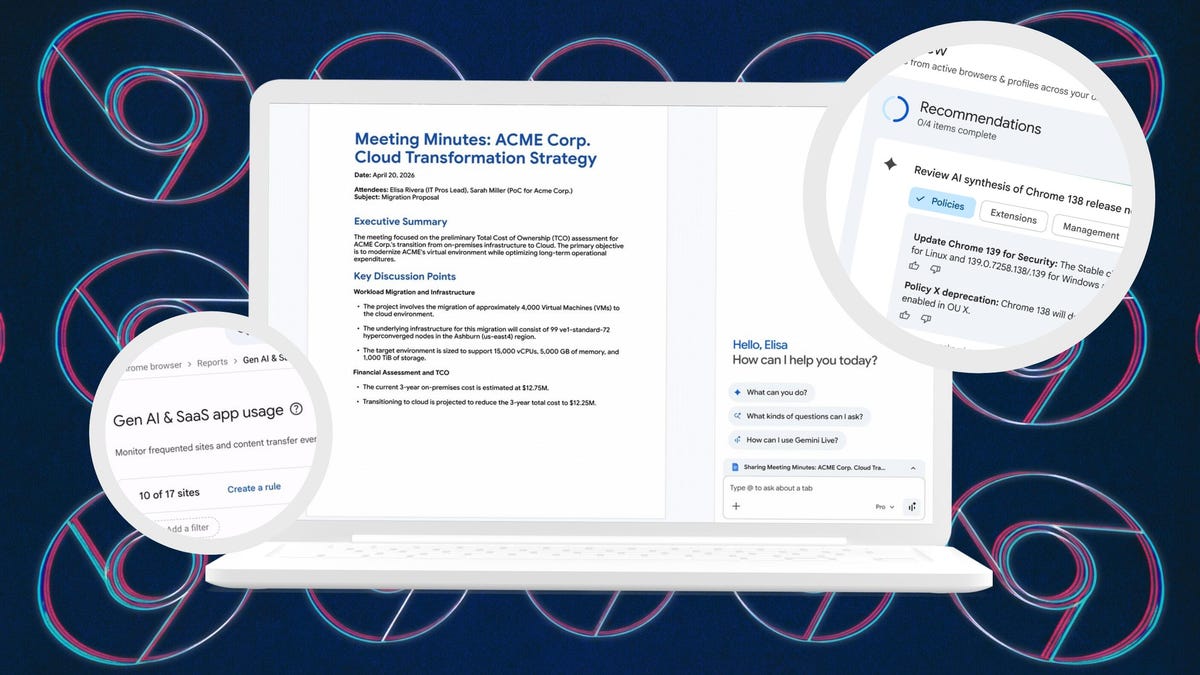
The introduction of “Auto Browse,” a feature powered by Google’s Gemini AI, allows users to delegate tasks across their open browser tabs. For instance, if an employee is drafting a document while simultaneously browsing a company website and using a customer relationship management (CRM) system, they can instruct Gemini to perform a task that involves all three platforms. Google has stated this could streamline efforts, such as transforming document content into actionable sales opportunities by automatically creating contacts and setting up entries in the CRM. However, a layer of security remains, as users must approve actions before they are finalized.
In addition to Auto Browse, Google is introducing “Skills,” which enable employees to save and reuse specific AI workflows with a single click. This functionality, which has been available for individual users, is now being rolled out to Workspace users. Employees can record repetitive prompts, allowing them to execute those tasks efficiently across various pages. Similar to Auto Browse, Skills require user confirmation prior to execution, ensuring that employees maintain control over their interactions with AI.
As companies increasingly integrate AI into their workflows, Google acknowledges the emergence of “Shadow AI,” a term denoting the risk of sensitive data being accessed through unmonitored tools. To mitigate this risk, Chrome Enterprise now provides IT teams with vital insights into AI tool usage within their organizations. This includes monitoring which tools employees engage with and identifying unusual activity. Google’s GenAI and SaaS report is designed to distinguish between sanctioned and unsanctioned tools, while the platform’s extension telemetry allows administrators to detect potentially harmful behavior.
The updated system also equips IT departments with tools to manage potential security threats effectively. They can now block risky extensions based on third-party risk assessments, enforce restrictions by category, and remotely uninstall unapproved tools. Furthermore, a new “Gemini Summary” module has been integrated into the admin dashboard, offering AI-generated summaries of updates, highlighted changes, and actionable suggestions for IT administrators.
To bolster security further, Google has announced new partnerships, notably with Okta, to enhance authentication processes. These collaborations aim to prevent session hijacking by binding authentication sessions to secure device hardware, ensuring that stolen cookies cannot be utilized. Additionally, IT teams can now remotely clear browsing data on compromised devices, further safeguarding sensitive information.
Google’s updates to Chrome Enterprise represent a significant step in the ongoing evolution of workplace technology. As companies grapple with the integration of AI tools, these features not only aim to improve efficiency but also address mounting security concerns associated with AI use in corporate settings. With the rise of AI, organizations must balance innovation with security, making such enhancements timely and critical for businesses navigating the digital landscape.
See also WAGroup Launches AI Tool to Streamline WhatsApp Group Marketing for Businesses
 Goldman Sachs Initiates Buy on Dynatrace as AI-Driven Observability Gains Traction
 AI Tools Transform Workflows: Automate Tasks and Enhance Decision-Making Today
 Cloudsmith Secures $72 Million in Series C to Enhance AI-Driven Software Supply Chain
 Adobe Expands Partner Ecosystem, Launches AI-Powered CX Enterprise Platform